POS for Magento 2 · Magento 2 extension
For Magento Open Source and Adobe Commerce 2.4.9

Magento 2 POS System

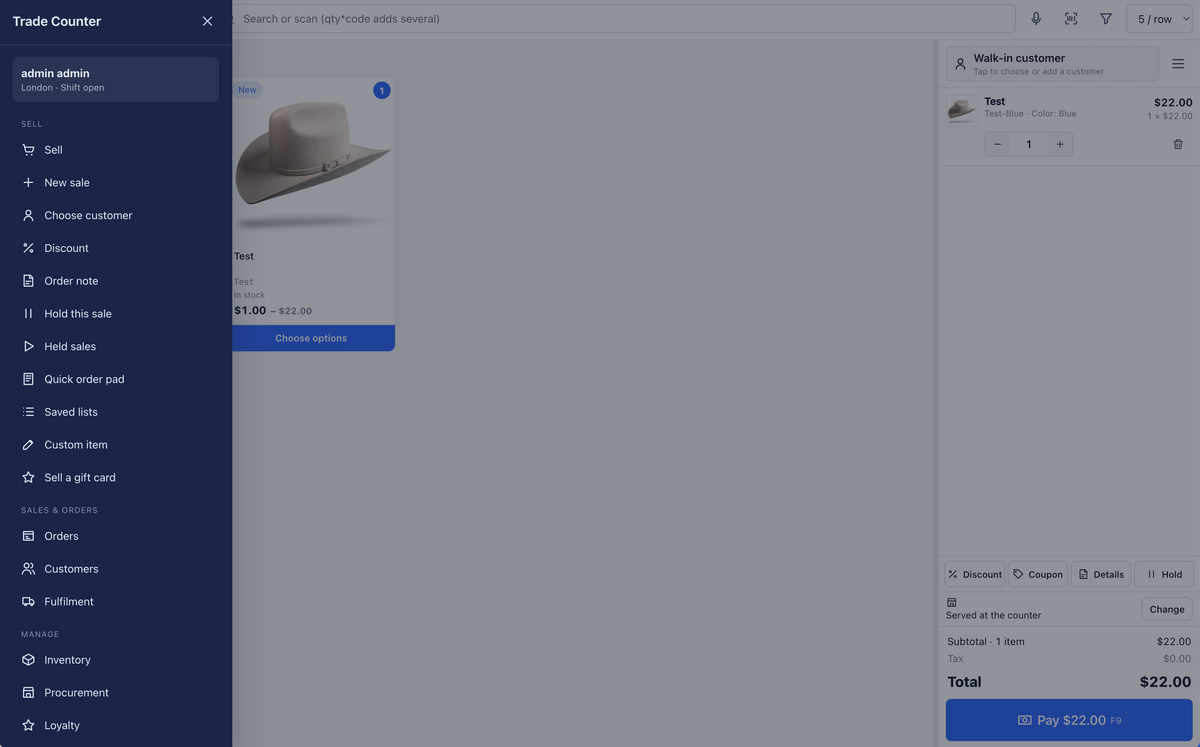
A point of sale that lives inside your Magento store. Your products, prices, customers and stock are already there, so the till picks them up and gets to work. Serve walk in customers at the counter, take orders over the phone, hand over click and collect parcels and keep selling even when the internet drops. It runs in the browser on a desktop, a tablet or a phone.

10 connected payment providers
118 API endpoints for apps and integrations
15 min to install
3 ready made staff roles
Magento 2 POS System
Live demo

Try the admin and the till before you buy

Two demos, both switched on with every feature. Log in to the Magento admin to see the settings, roles and reports, then open the till and ring up a sale like your team would. Nothing you do there touches a real store.

Magento admin

Admin backend demo

See where managers work. Registers and warehouses, the ten payment providers, loyalty rules, staff roles, and the extra POS columns on the Magento order grid.

Address
Coming soon
Username
Shared on request
Password
Shared on request
Demo link coming soon
POS till

POS frontend demo

The till your staff use every day. Scan or tap products, pick a customer, hold a sale, split a payment, print a receipt and move an order across the fulfilment board.

Address
Coming soon
Username
Shared on request
Password
Shared on request
Demo link coming soon

Both open in a new tab. The demo resets itself regularly, so feel free to click everything.

Works beside your store

Nothing changes for your online customers

The POS sits next to your storefront, not on top of it. Your theme, your pages and your checkout carry on exactly as they are. Both sides share one Magento, so a sale at the counter and an order on the website land in the same place, with the same stock.

your-store.com
Your storefront

The site your customers already know. Same theme, same layout, same checkout. We do not touch it.

One Magento Products, prices, customers, stock and orders
your-store.com/pos
Your till

A separate address just for your team. Staff sign in with their Magento login and unlock it with a PIN.

01 Walk in customersScan, take payment and hand over a receipt in seconds.
02 Orders over the phoneFind the customer, build the basket, send a QR payment or put it on account.
03 Collect in storePick the pickup point, then let the board email them when it is ready.
04 Web orders on the shop floorOnline orders can show up on the fulfilment board for your store team to pick.
Everything in the box

Every feature, included from day one

This is the whole manual, in plain words. Pick an area or search for the thing you need. Your staff only see what their role allows, so the till stays simple for the people using it.

For cashiers

Selling at the counter

Scan, tap or search and the sale builds itself. Everything comes straight from your catalogue.

  • Scan barcodes with any USB or Bluetooth scanner, from any screen
  • Tap products in the grid, with a picker for sizes and colours
  • Search by name, SKU or barcode, and type 3* to add three at once
  • Scan with the camera on a phone or tablet
  • Custom items for anything that is not in the catalogue
  • Tap a line to change the quantity, discount it or change the price
  • See stock in every warehouse right from the basket
  • Hold a sale with F7 and bring it back with F8
  • Sell gift cards, with the code printed or emailed to the recipient
  • Serial numbers scanned per item, so warranty records stay tidy
For cashiers

Customers, phone orders and delivery

Taking an order over the phone feels the same as serving someone at the counter.

  • Pick or create a customer on the spot with F4
  • Search by name, email, phone or company
  • Trade and wholesale group prices apply by themselves
  • Reward points and tier show next to the customer's name
  • Take now, collect later or deliver to a saved address
  • Live carrier rates, or type your own delivery charge
  • Discounts and coupons, with manager PIN approval above your limit
For cashiers

Taking payment

Press Pay or F9 and choose how the customer is paying. The till does the rest.

  • Cash with quick buttons, big change figures and optional rounding
  • Your own card machine, recorded with a reference
  • Stripe, SumUp, Dojo, Adyen and Square terminals that finish the sale by themselves
  • QR payments with PayPal, Worldpay, GoCardless, Checkout.com, Airwallex and SumUp
  • Gift cards, store credit and reward points
  • On account for business customers with credit terms
  • Split a sale across any mix of methods
  • An approved payment is never lost, even if the connection drops
For the whole team

Receipts, orders and refunds

Everything that happens after the sale, without leaving the till.

  • Print a receipt, a gift receipt without prices or an A4 invoice, or email it
  • Find any order by number, name, email or phone, with filters
  • Take payment on online orders and orders on account
  • Ship or hand over goods, with a tracking number
  • Reorder the same items into a new sale
  • Refunds go back through the same terminal or QR provider automatically
  • Gift card, credit and points payments go back where they came from
  • Refund to store credit if your shop allows it
  • Choose whether returned items go back into stock
For cashiers and managers

Shifts and cash

Keep the drawer honest, one shift at a time.

  • Open a shift and count the float
  • Cash in and cash out for anything that is not a sale
  • Close the shift and see the expected amount and any difference
  • Print a Z report for your records
  • See whether each card terminal is online
  • Refund any payment that was approved but never became a sale
For store teams

Fulfilment and store pickup

A simple board that moves orders from new to done.

  • Columns for New, Picking, Packed, Ready for pickup, Shipped and Done
  • Orders waiting more than two days get a red edge
  • Ready for pickup emails the customer, with your own note if you like
  • The shipment is created in Magento with carrier and tracking
  • One pick list with stock per warehouse across all the orders you tick
  • Filter by warehouse, pickup or delivery
  • Online orders can appear on the board too
For stock controllers

Inventory and warehouses

Live stock for every location, and the tools to keep it accurate.

  • Live stock in every warehouse, with low stock in orange
  • Corrections and full stock counts, each with a reason
  • A movement diary showing who, when, why and the new quantity
  • Transfers between warehouses with send, receive and delivery notes
  • Anything lost on the way is recorded
  • Serial numbers with status and warranty dates
  • Generate missing barcodes and print roll or A4 labels
  • Find barcodes used by more than one product
  • A SKU generator that follows your pattern and checks for duplicates
For stock controllers

Procurement

From we are running low to it is on the shelf.

  • Suppliers with contacts, lead times, payment terms and minimum orders
  • Supplier codes, costs, minimum quantities and pack sizes per product
  • Purchase orders emailed straight from the POS
  • Receive part deliveries, the order stays open until it is all in
  • A forecast with daily sales and days of stock left
  • One draft purchase order per supplier in a single click
  • Drafts created every night if you switch it on
  • Backorders flagged as can ship the moment stock arrives
For managers

Loyalty, store credit and gift cards

Reward the people who keep coming back, online and in store.

  • Points earned in store and online, on the amount before tax and delivery
  • Tiers such as Silver and Gold multiply the points
  • Points can expire, and are taken back fairly on refunds
  • Store credit that pays for future purchases
  • Search, check, disable and adjust gift cards
  • Goodwill gift cards issued without a sale
  • Gift cards sold on account unlock once the order is paid
  • Managers adjust points and credit, always with a reason
For managers

Analytics

Numbers that help you make good decisions.

  • Till sales, online sales or both, for any period
  • Group by day, week, month, hour, weekday, product with margin or category
  • Or by payment method, register, staff member, warehouse or customer group
  • Sales, average sale and items per sale for every person and register
  • Discount and refund rates, and cash differences
  • A heat map of your busiest hours, great for planning rotas
  • Stock value at cost and retail, low stock and dead stock
  • Export every report to a spreadsheet
For everyone

Working offline

When the internet takes a break, your shop does not have to.

  • An orange bar says Offline and the till carries on
  • Products and customers are saved on the device in the background
  • Cash, your own card machine and vouchers still work, with change and receipts
  • Sales upload by themselves when you are back, oldest first
  • They become normal Magento orders at the prices the customer paid
  • Offline receipt numbers start with OFF, so they are easy to spot
  • Any upload that fails shows the reason and can be retried
For managers

Staff, roles and PINs

Each person gets exactly the screens they need, and nothing more.

  • Three ready made roles: Cashier, Stock Controller and Manager
  • Build your own roles from the ACCUDY POS permissions
  • Staff sign in once, then unlock with their own PIN
  • The till locks itself when idle, or with the padlock and F12
  • A colleague can switch user from the lock screen
  • Manager PINs approve bigger discounts and price changes
  • Five wrong PINs pause PIN sign in for fifteen minutes
  • Full administrators stay out of the till unless you allow them
For whoever runs Magento

Settings, admin and health check

Set it up once in the Magento admin, then let the team get on with it.

  • Registers, each with its own warehouse, receipt layout and brand colours
  • Different settings per website or store view
  • Order grid gains Register, Served by, Warehouse and Fulfilment stage columns
  • An ACCUDY POS box on every order with payments, staff, shift and approvals
  • Anything that needs attention starts with ACTION NEEDED
  • Scheduled jobs expire points, draft purchase orders and tidy payments
  • A doctor command checks PHP, the database, settings and the web server
  • Upgrade from TradePos 1.x with your data carried across
For developers

Mobile apps and REST API

Everything the till can do is available through a secure REST API.

  • 118 endpoints, one for every feature
  • Every endpoint respects the same staff permissions as the till
  • The foundation for the ACCUDY POS apps for iPhone, iPad and Android
  • Token sign in, with a minimum app version you control
  • Build your own integrations on the same API
Built for speed

Keys your team will learn in a morning

Plug in a keyboard and the till flies. Every screen also has a Help button in the left rail.

  • F2Start a new sale
  • F3Jump to search
  • F4Choose a customer
  • F6Discount the sale
  • F7Hold the sale
  • F8Open held sales
  • F9Take payment
  • F12Lock the till
  • ?Open help
Payments

Ten connected providers, plus the ones you already use

Money is always taken before the order is created, and every payment can only be used once.

Card terminals the till controls StripeSumUpDojoAdyenSquare
QR payments on the customer's phone PayPalWorldpayGoCardlessCheckout.comAirwallexSumUp QR
Always there CashYour own card machineOn accountGift cardsStore creditReward pointsSplit payments

Your API keys are stored encrypted and never reach the browser. Start in Test mode and use Simulate to try approvals and declines without a real card.

More coming soon

Buy once. Every new feature is yours.

We keep building. New features, new payment options and improvements land regularly, and your licence includes every one of them for the life of the product. No subscription, no upgrade fees, no surprises.

For life every update included See what is coming
Installation

Up and running in about fifteen minutes

Copy the Accudy/Pos folder into app/code, run these commands from your Magento folder, give your staff a POS role and open your-store.com/pos. The last command is a health check that tells you exactly what to fix if anything is not right.

your-magento-folder
bin/magento module:enable Accudy_Pos
bin/magento setup:upgrade
bin/magento setup:di:compile
bin/magento accudypos:app:deploy
bin/magento cache:flush
bin/magento accudypos:doctor

Moving from TradePos 1.x? Your settings, roles, held sales, shifts, PINs and Stripe payments come across with you.

Before you start

What your server needs

Magento
Ready Magento Open Source or Adobe Commerce 2.4.9.
PHP
Ready PHP 8.3 or 8.4.
HTTPS
Needs setup Your store needs HTTPS. The camera scanner, offline mode and payment providers all rely on it.
Magento cron
Needs setup Cron needs to be running for points expiry and nightly purchase order drafts.
Outgoing internet
Good to know Your server needs to reach the payment providers you plan to use.
Devices
Ready Runs in the browser on desktops, tablets and phones. Any USB or Bluetooth barcode scanner works.
Your theme
Ready Any storefront theme. The POS lives at its own address and does not change your storefront.
Questions

Things people ask us

Will it change my Magento theme or storefront?

No. The POS is a Magento module that adds a till at its own address, usually your-store.com/pos. Your theme, your pages and your checkout stay exactly as they are, whether you use Luma, Hyvä or a design built just for you.

What does the $690 include?

Everything in the manual. Selling, payments, fulfilment, inventory, procurement, loyalty, analytics, offline mode, staff roles and the REST API. Nothing is held back for a higher plan, and every future update is included for life.

Can we take orders over the phone?

Yes. Pick or create the customer, build the basket, choose collect later or delivery with a carrier rate, then take payment with a QR code the customer pays on their own phone, on account, or on your card machine.

What happens if the internet goes down?

The till keeps selling with the products and customers it saved earlier. Cash, your own card machine and vouchers still work. Once you are back online, the sales upload by themselves and become normal Magento orders.

Which card terminals work with it?

Stripe, SumUp, Dojo, Adyen and Square terminals are controlled by the till and finish the sale on their own. You can also keep your current card machine and simply record the payment.

How long does installation take?

About fifteen minutes for whoever looks after your server. Copy the module in, run six commands and finish with the built in health check, which tells you exactly what to fix if anything is not right.

We use TradePos 1.x. Can we upgrade?

Yes. Your settings, role permissions, held sales, shifts, cash movements, staff PINs, order details and payment codes come across. Stripe payments are carried over too, so older card sales can still be refunded to the card.

Do new features cost extra?

No. Your licence includes lifetime updates, so every new feature we add is yours at no extra cost.